
Effective commercial interiors rely on a balance between clean lines and spatial function. However, this presents a critical challenge for designers — cord organization. With each desk requiring multiple equipment and lighting options, loose cords and power bricks can easily clutter the space. By integrating thoughtful cable management solutions into the initial layout, designers can prevent this visual mess, keeping the original design aesthetic intact.
In this article, we’ll explore how poor cable management can affect workspace design and functionality. We’ll also outline strategies for incorporating cable management into workstation design.
The Impact of Cable Management on Design Intent
Designers invest significant time and effort into creating intentional layouts that establish the right mood and reflect a company's brand identity. From the wall paint and floor finish to the furniture and lighting, every choice serves a clear purpose in elevating the professional environment. However, when tech integration is neglected during this planning phase, the resulting clutter quickly compromises the final layout.

By implementing cable management solutions from the very beginning, designers ensure the original vision transitions smoothly from concept to completion. While providing accessible power is essential for productivity, these electronic connections require proper routing to keep a floor plan clean.
Without this early coordination, unmanaged wiring disrupts a finalized space in several distinct ways:
- Compromised Aesthetics. Exposed, sagging power cords beneath desks can ruin the look of an open-plan office.
- Last-Minute Fixes: When routing is overlooked, installers may resort to mismatched plastic ties. Quick fixes like this create an inconsistent appearance that detracts from the clean look of the workspace.
- Tripping Hazards: Loose cables create dangerous obstacles. Employees moving around the office can easily snag a foot on unkempt wiring on the carpet. This simple accident can instantly unplug active hardware or cause a serious personal injury during a busy workday.
- Hardware Strain: Dangling cords place constant physical tension on device ports, leading to premature equipment failure or power disconnects. For instance, if a sit-to-stand desk rises without adequate cord slack, the sudden tension can pull expensive docking stations out of alignment.
- Reduced Flexibility: Workstations without organized power infrastructure restrict quick reconfigurations as team layouts change. Moving a desk cluster or adding a new employee can cause major disruptions whenever wiring must be manually unraveled.
Cable Management Solutions for Workstation Design
When technical accessories meet end users' operational needs, the work environment operates more efficiently. This is why planning the electrical infrastructure as part of the initial office layout is critical. By selecting the right cable management solutions during the drafting phase, designers can transform standard desks into highly adaptable work hubs.
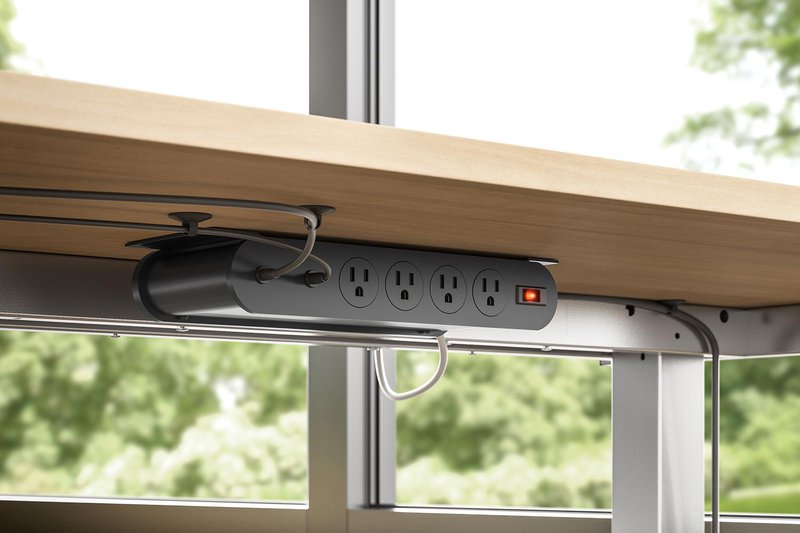
Consider these primary strategies to integrate wire management directly into workstation furniture layouts:
- Under-Surface Wire Trays. Specifying dedicated power slings or under-desk wire trays mounts bulky utility bricks directly beneath the work surface. This strategy keeps excess cord slack hidden and ensures the office floor remains entirely free of electronic clutter.
- All-In-One Power Hubs. Using central desktop distribution hubs routes power to multiple devices on a single workstation using only one primary cord to the wall outlet. This streamlined setup drastically reduces the total number of loose wires traveling down to building baseboards.
- Surface Mounted Units. Low-profile power blocks can be mounted directly on or integrated into the work surface, placing power receptacles exactly where users need them. Placing outlets directly at the work surface eliminates the need to run long, dangling cords off the edge of the desk.
- Desktop Grommet Routing. Positioning surface cutouts and grommets near monitor mounts allows peripheral cords to drop straight down into below-surface containment systems. This layout choice minimizes visible cable runs in open work zones and maximizes usable desk space.
- Integrated Power. Combining the layout with streamlined power solutions ensures that outlets sit exactly where users need them. Positioning surface-mount or clamp-on power blocks near integrated cable paths eliminates the need for long, dangling cords stretching across the office.
From Specs to Site: How LightCorp Simplifies the Process
Managing tech infrastructure is often the biggest hurdle in office design projects. Taming massive hardware cords while keeping work surfaces completely clear can challenge even the most experienced design teams. Partnering with a power solutions provider that prioritizes easy integration makes a substantial difference in overcoming these layout challenges.
To bridge this gap, LightCorp eliminates the headaches of specification by offering specialized tools engineered to streamline commercial infrastructure. Designers and dealers can easily download exact dimensional data and symbols to make planning for workspace power easier.
This straightforward approach carries directly over to the physical hardware, which is built to tackle cord chaos head-on. For example, we offer power slings that use spacious bi-level steel trays and side forks to hold bulky utility bricks directly beneath desks. For dynamic sit-to-stand setups, we have heavy-duty power hubs that consolidate desktop connectivity into a single main cord, eliminating webs of wires.
Integrating these smart cable management solutions at the beginning of a commercial project protects aesthetic intent, enhances individual desk functionality, and prevents costly delays. LightCorp provides the streamlined tools and predictable production schedules needed to specify workplace infrastructure with complete confidence. Contact LightCorp today to simplify your next commercial design installation.