
Workstation lighting often appears balanced after its initial installation, but that equilibrium can break once the office is used on a day-to-day basis. Fixed task lighting frequently leaves areas overlit or in shadow as floor plans evolve and teams move between workstations. What looks consistent on a plan during the design phase can quickly turn into uneven visibility.
Suboptimal lighting creates immediate friction for those in the office. A team member might lean in to see documents or constantly reposition a monitor to avoid glare. When lighting fails to adapt, people adjust their posture instead of working ergonomically.
In a hybrid environment, responsive lighting maintains consistent, reliable visibility. Whether for assigned, shared, or flexible desks, lighting decisions directly shape how comfortable a space feels.
In this guide, we’ll explore how to select the right equipment for different workstation types. We’ll also identify specific design challenges and outline adaptable lighting solutions that can support day-to-day productivity.
How Workstations Change Task Lighting Needs
The ways in which people use a workspace often shift throughout the day. Fixed fixtures often create problems as soon as these tasks change. For instance, a light angled for a monitor might reflect glare on a screen while leaving physical documents underlit. This lack of flexibility forces people to constantly adjust their posture.
Meanwhile, shared desks and unassigned workstations introduce additional variability in height, position, and device needs. One person may center a laptop, while another shifts to the side with multiple devices. This creates uneven coverage across the same desk.
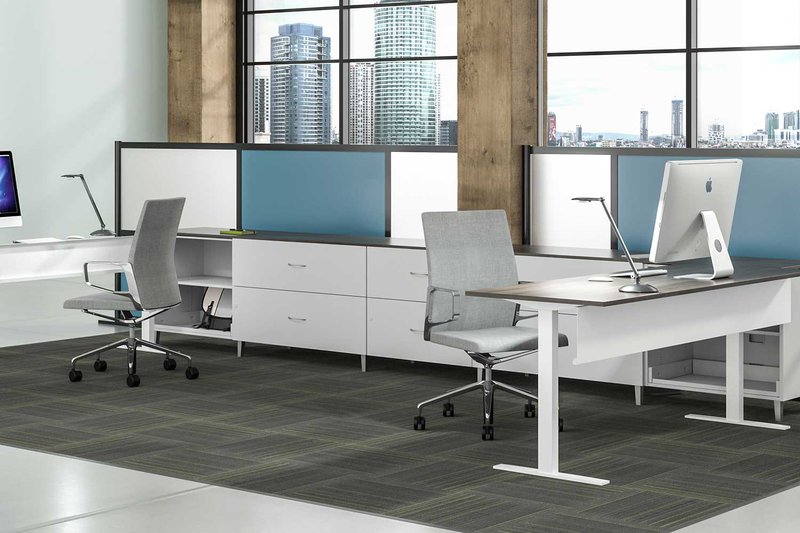
Ensuring the lighting adapts to different work needs keeps visibility stable. High-performance solutions allow team members to work with agility across screens and documents without needing to adjust the equipment throughout the day.
How to Plan Lighting for Changing Workstations
Effective planning requires looking beyond the static floor plan to see how individuals interact with the workspace throughout the day. When a lighting setup is too rigid, it fails to support the movement between digital and analog tasks. Proper planning ensures the illumination stays as dynamic as the work being performed.
Here are a few criteria worth taking note of when planning lighting for hybrid environments:
- Focus on Contrast Ratios. Planning should aim for balanced luminance between the monitor and the surrounding desk surface. Maintaining a consistent ratio prevents eye strain and ensures that task lighting supports visual comfort across various devices.
- Prioritize Intuitive Controls. In environments where multiple people use the same space, controls must be easy to find and operate. Simple, tactile dimming and movement are essential for day-to-day use.
- Evaluate Mounting Options. The choice of a base—whether it is a freestanding base, a grommet mount, or a clamp—determines how easily a fixture can be re-positioned. Selecting the right mount during the planning phase ensures the lighting can adapt if a desk needs to be rearranged later.
- Consider Multi-Axis Movement. True flexibility comes from fixtures that offer multiple points of articulation. When planning for varying user heights and postures, choosing arms with a wide range of motion ensures that light reaches exactly where it is needed without causing glare.
Establishing these standards for lighting ensures that workstations remain resilient as floor plans evolve. This makes it simpler to meet the unique demands of each workstation type.
Applying Task Lighting Across Individual, Shared, and Flexible Workstations
Task lighting performs differently depending on how each workstation is used and how often that use case changes. Applying the same approach across every area leads to uneven visibility and inconsistent experiences. Below, we break down how each workstation type requires different lighting placements and adjustability, as well as how to optimize them depending on user needs.
Assigned Desks
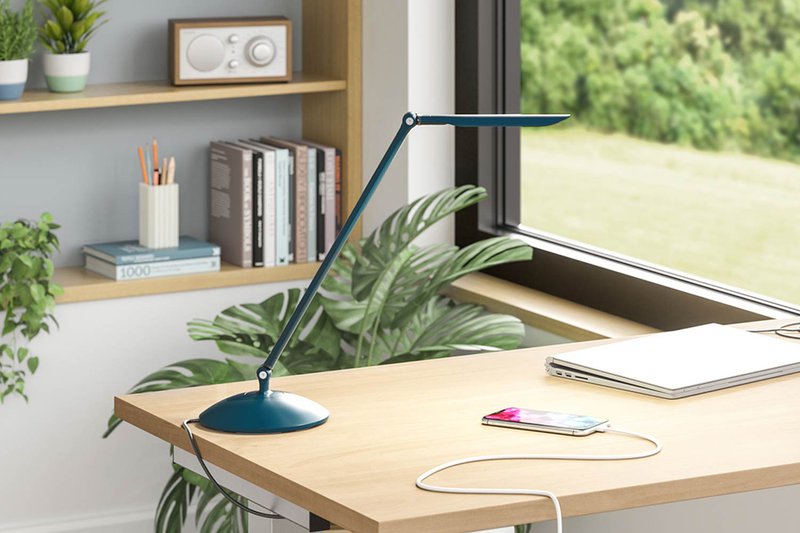
At individual desks, the primary design challenge is that fixed illumination levels often fail as tasks change. While the station has one primary user, that person shifts between digital work and analog tasks throughout the day. A fixture without range can leave physical documents dim or cause reflections on a monitor.
When choosing lighting for individual desks, try to incorporate fixtures with integrated dimming capacity. Moreover, lighting should be flexible enough to support the different day-to-day needs of end users.
Shared Workstations
Shared desks are typically utilized by a specific group of people at different times, such as a team that operates on rotating shifts. Because the users are known, but their physical needs vary, the challenge is to accommodate personal preferences.
- Focus on user-to-user variability in posture and device height.
- Provide dimming and second arms to allow individuals to quickly re-position the fixture to their specific comfort level.
Unassigned Desks
Unassigned desks are open to anyone in the office and are often used for shorter durations or touchdown tasks. The design challenge is to support a wide range of users without requiring individual personalization or long-term storage.
- Ensure the task lighting is intuitive and requires zero learning curve for new users.
- Utilize dimming and second arms to provide a universal ergonomic range that fits most people immediately.
- Choose a lighting system that can adapt to different work layouts.
Flexible and Reconfigurable Workstations
Flexible workstations are designed to adapt to different layouts or configurations over time. The focus here is on how the workstation itself changes rather than who uses it. The primary challenge is maintaining consistent illumination as desks are rearranged or rotated to support evolving team needs.
- Utilize clamp-mounted bases to allow equipment to move as floor plans shift.
- Add second arms to provide the superior articulation required for layout changes.
Deliver Task Lighting That Holds Up in Real Work Conditions
Task lighting only proves itself once workstations are used by different end users across changing tasks and setups. A designer’s decisions around placement, adjustability, and coverage determine whether lighting supports the space or creates daily friction. When task lighting adapts to real-world use, end users stay focused rather than adjusting their setup to compensate.
At LightCorp, we design task lighting, power, and workspace solutions for how spaces are actually used, not just how they are planned. Flexible configurations, reliable performance, and fast lead times help deliver environments that hold up under real conditions. For task lighting that works as designed, talk to us at LightCorp today.