
Great lighting is a critical component of office design. It can create a soft, inviting atmosphere or provide clarity, depending on the space's functional requirements. However, ambient and accent lighting are rarely ideal for independent work as overhead fixtures often cast shadows and cause glare. This is where incorporating a desk light into the initial furniture specification is critical.
Having a desk light enables end users to easily adjust brightness levels to suit specific tasks. This control keeps individuals focused and comfortable despite the overhead fixtures. Specifying desk lighting early allows commercial interior designers and dealers to integrate functionality with the broader aesthetic.
In this article, we explore why desk lighting specifications protect design intent, streamline project budgets, and optimize the entire workspace layout.
Why the Desk Light Belongs in the Initial Workstation Spec
Treating lighting as a last-minute add-on often causes layout and logistical problems for designers and occupants alike. For example, with dual-monitor setups becoming the office standard, adding a desk light after the layout is finalized could leave no room for a desktop’s base, or the lamp's articulating arm could collide with the back of monitor screens.
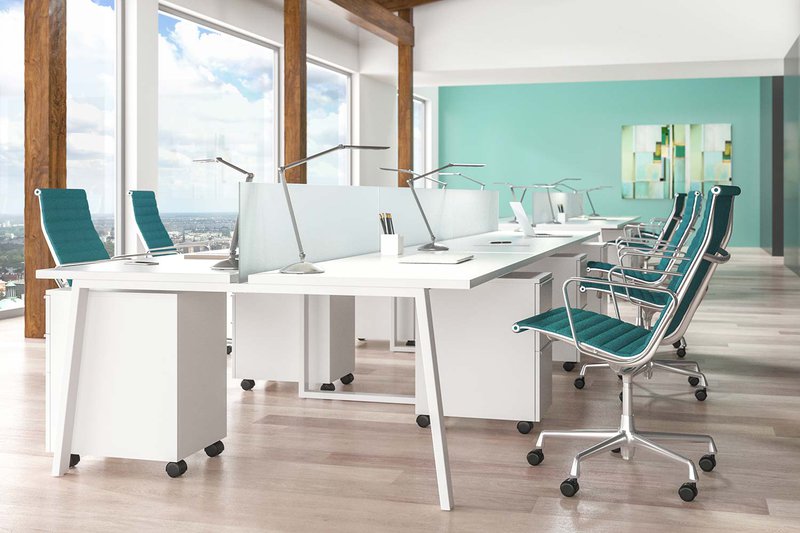
An oversight like this forces designers to compromise ergonomic layouts, squeezing lamps into tight corners where they cast awkward shadows and leave work surfaces feeling cramped. That said, integrating a versatile task lighting solution early in the design phase offers several advantages:
- It protects the budget. Incorporating desk lighting in the bill of materials ensures that funds are locked into the contract before the budget tightens. This keeps the original design intact and ensures the space functions as intended without unexpected post-launch costs.
- It simplifies power planning. Specifying each desk light at the initial layout stage allows the electrical team to accurately calculate workstation power needs. This ensures that the layout includes enough built-in desk outlets to safely power all user devices. It also eliminates the risk of overloaded circuits or messy cords trailing across the floor after move-in day.
- It secures design consistency. Selecting the desk light early gives designers time to match hardware finishes with the workstation frames. It ensures the lighting blends with the broader office aesthetic instead of looking out of place. This careful coordination prevents mismatched metal finishes or clashing plastic components from disrupting the final workspace design.
When designers plan for desk lighting from the start rather than treating it as a decorative accessory, the design process becomes more straightforward. Dealers can protect their profit margins, while clients receive a functional workspace that supports well-being from day one. This approach eliminates the stress of post-occupancy modifications and last-minute design changes.
The Pillars of Workstation Desk Lighting
Office design often prioritizes furniture comfort, but visual comfort is equally vital for a healthy workspace. A properly illuminated environment prevents the hidden physical fatigue that standard overhead fixtures frequently cause. Focusing on the core principles of lighting design ensures that the selected desk light improves the work environment for end users.
True ergonomic lighting design relies on three important factors to support human health and performance:
- Balancing Light Levels: Standard ambient lighting often leaves a stark contrast between a bright computer monitor and a dark desktop. A proper desk light balances these brightness levels, preventing the constant eye strain caused by moving between extreme light and dark surfaces.
- Reducing direct glare: Harsh, unshielded light sources that reflect off screens or glossy surfaces can cause eye fatigue and headaches. Effective task lighting is designed to direct light onto the work surface, shielding the source from the user's line of sight.
- Shadow Counteraction: Large overhead fixtures cast shadows when users lean over their desks to review physical documents or write notes. Placing dedicated lighting within the immediate work zone reduces these shadows and keeps reading materials visible and clear.
When a workspace incorporates these pillars, employees can maintain a neutral, healthy posture instead of slouching forward to see their work. This approach to workplace well-being transforms standard office furniture into a high-performance workstation.
Key Specifications to Look For in a Desk Light
The choice of desk lighting can make or break an ergonomic work layout. A high-quality fixture must seamlessly support daily tasks while protecting user comfort. To achieve this, it needs to create comfortable lighting that can be adjusted as needed. Without this precise light control, even the best ergonomic chairs and height-adjustable desks fail to prevent eye fatigue.
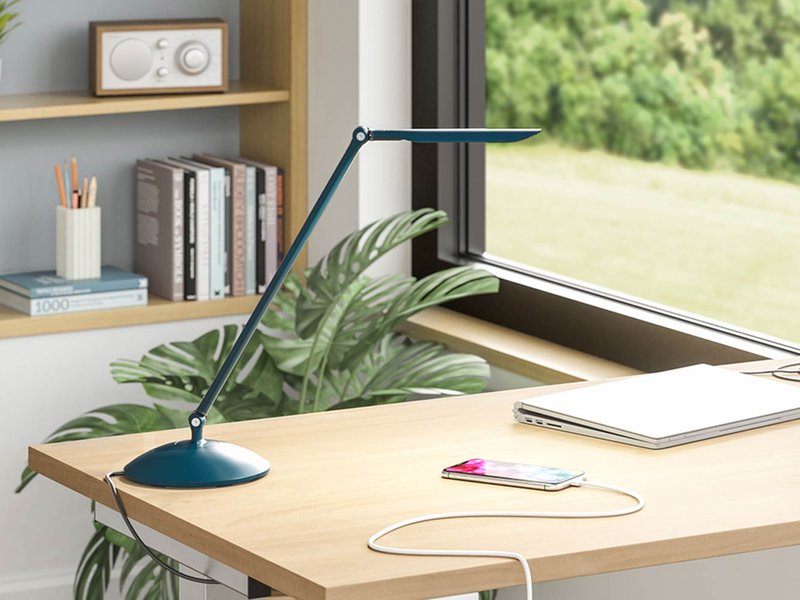
To be a good fit for a design project, a desk light must possess specific structural and technical strengths. Look for these key features to ensure the lighting choice delivers long-term ergonomic value:
- Physical Articulation. Look for a fixture with adjustable joints and fully articulating arms that tilt and turn smoothly. This allows users to control the light source's position and eliminate glare on computer screens.
- Intelligent Energy Management. Choose lamps with built-in occupancy sensors that automatically turn off after a set period of inactivity. This smart feature lowers building energy costs and extends the lifespan of high-efficiency LED components.
- Precise Dimming Control. A premium fixture should offer step-dimming or continuous touch-and-hold brightness adjustments to suit varying focus levels. This flexibility allows users to shift from high-focus paperwork to softer ambient lighting for video calls.
- Smart Memory Settings: Select lighting that features a built-in last-state memory function. This ensures the fixture automatically returns to the user’s preferred brightness level the moment it’s turned back on.
- Heavy-Duty Construction: Prioritize fixtures made from robust, commercial-grade materials that withstand daily use and adjustments. Durable manufacturing also prevents sagging arms and loose joints. In turn, this reduces maintenance and replacement costs for the facility.
Optimize Lighting Layouts with LightCorp
Specifying lighting options early in a design project eliminates late-stage layout revisions and installation delays. LightCorp streamlines this entire process, delivering high-performance workspace solutions that fit project timelines as planned. Our extensive catalog features premium desk lights, sophisticated under-shelf fixtures, and functional desktop tools designed to fit naturally into office settings.
We offer straightforward quoting, easily accessible technical sheets, and a dependable 10-day lead time. Contact LightCorp today to spec your next office build-out.